Vike

Your files, well in hand.

A native file manager for Mac. Find files as you type, work across folders in flexible panes, and keep Markdown, notes and properties close at hand.

Download free trial Buy Vike

Coming soon

  • Planned: 14-day trial
  • One-time purchase
  • 1 Mac per license
  • macOS 14 or later
  • Apple Silicon development build

A file manager I use every day

I used Windows for many years and picked up habits I couldn't live without: tabs, a favorites bar at the top, two panes side by side, and double-clicking empty space to go up a folder. When I moved to the Mac, file management never felt quite right, and search never felt fast enough.

I do research, run a small publication on the side, and now that AI is here I build little tools too. The more files I have, the more I need them to stay in order, and the less time I want to spend looking for them.

So I built Vike. It brings those habits to the Mac and adds file properties, flexible panes, and Markdown editing with a live preview. I use it every day. I hope it becomes yours too.

Familiar habits

Everyday file work, within easy reach

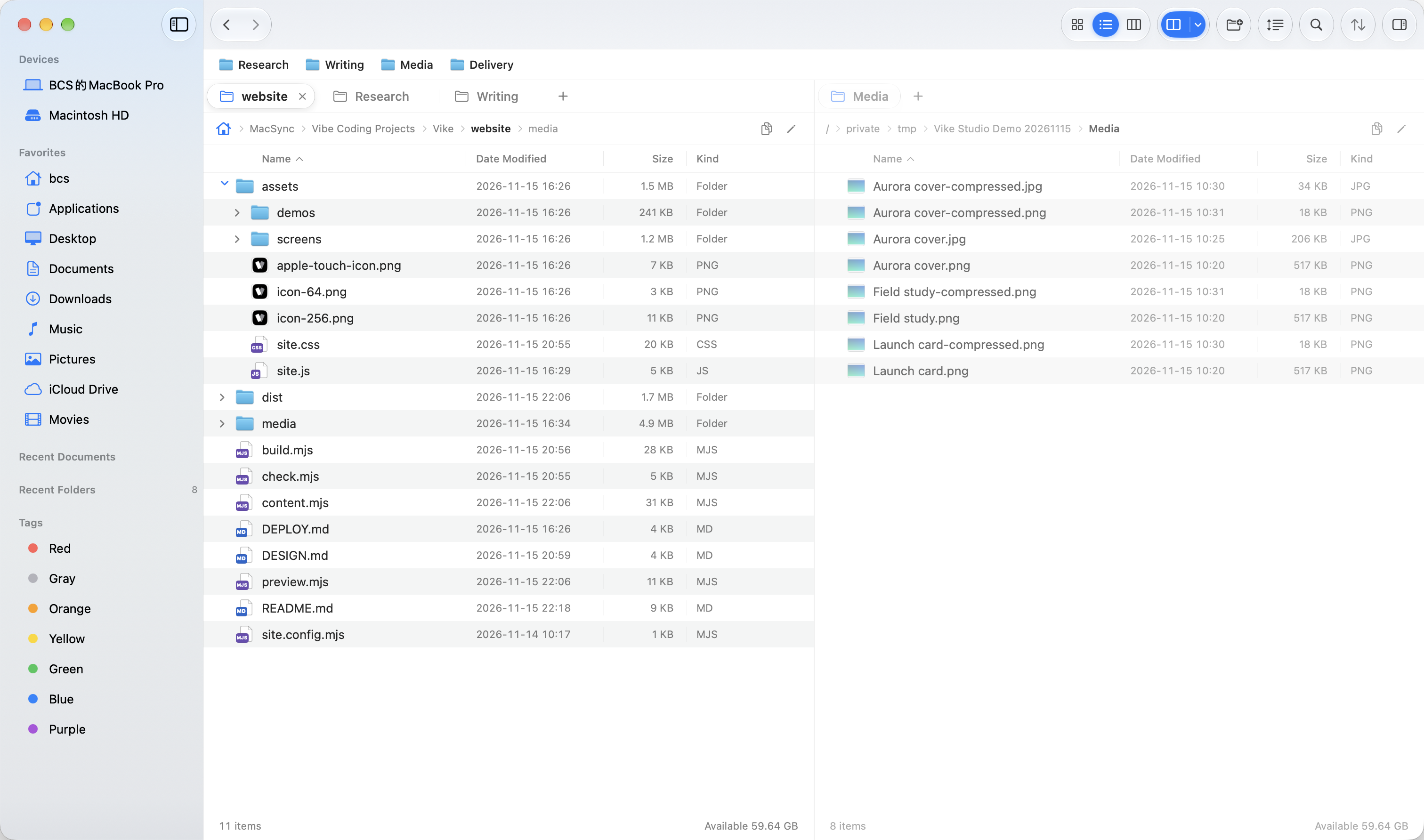
Keep favorite folders at the top and open folders side by side. Move between locations without losing your place.

  • Tabs in every pane, and a favorites bar along the top
  • Two panes side by side, or freely split into more
  • Double-click empty space to go up one folder
  • Set Vike as your default file manager
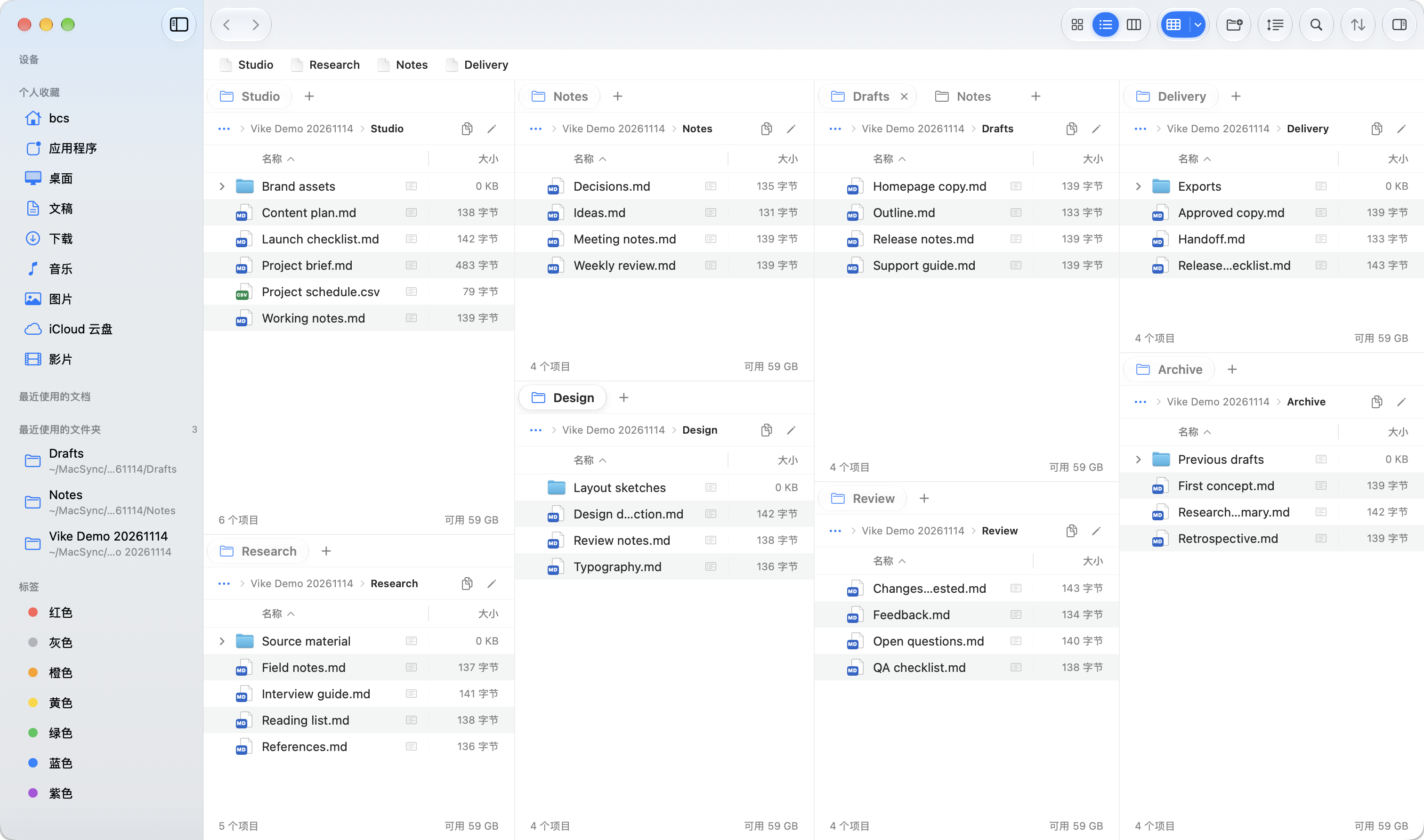
Vike with two panes, tabs in each pane, and a favorites bar at the top

Split freely, without a pane limit

Drag a tab out. Now it's a pane.

Split any pane right or down, pick a preset layout, or drag a tab to a pane's edge to make another. There's no fixed count limit: keep splitting while the window has enough room.

  • Single, side by side, stacked, three columns or a 2×2 grid, each with its own shortcut
  • Resizing keeps your layout; panes and tabs return when you reopen Vike
Arrange panes freely and work across folders in one window.

Markdown editing & live preview

Write and preview, in one place

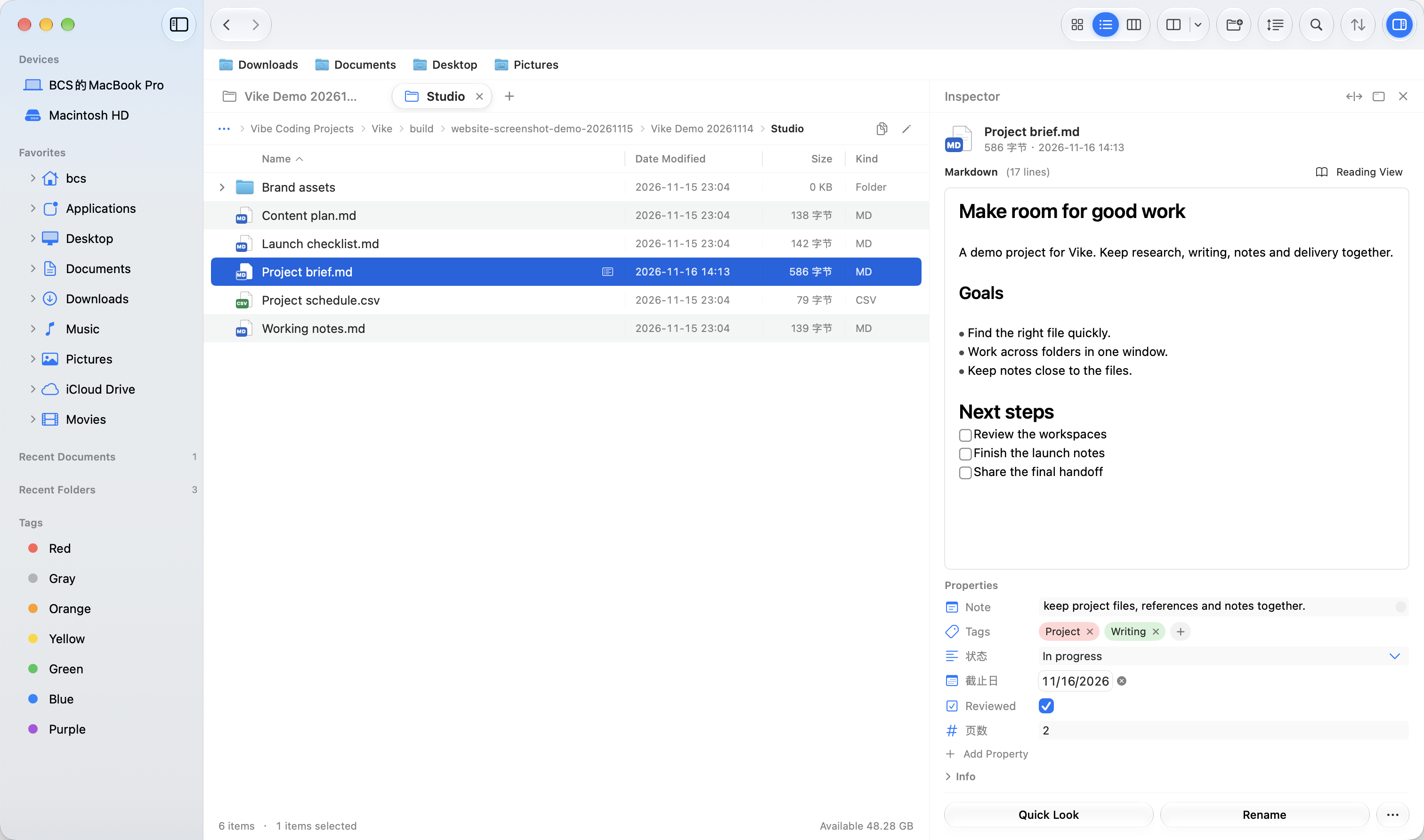
From notes and prompts to project documents, open Markdown where you manage your files. Edit in the preview, or open a separate window to see your source and formatted document side by side.

  • Code blocks are highlighted and checkboxes are clickable
  • Edits save automatically when you switch files
  • Detects external edits and preserves conflicting changes in a copy
A Markdown preview and file properties in Vike's inspector

Properties

Manage files like you manage notes

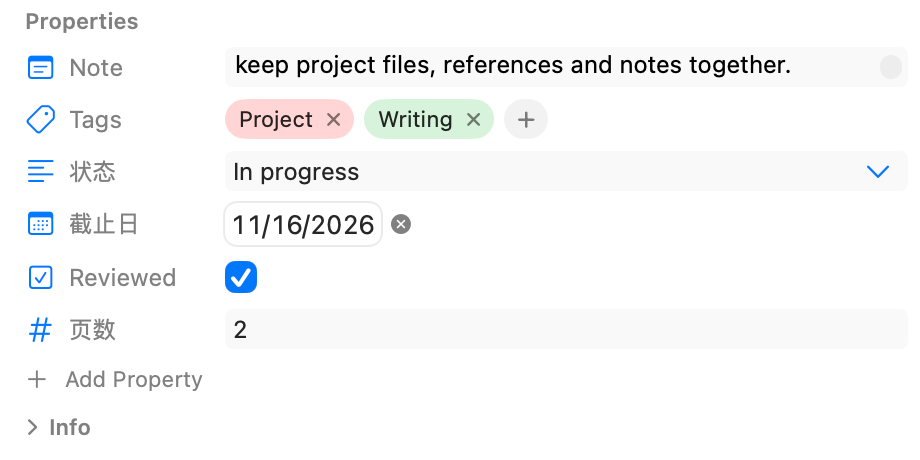
View and edit properties without leaving the file list. Jot down a note, tag, status or deadline as you work. Show properties as columns to read the whole folder like a table. Properties stay with the file when you copy or move it on disks that support them.

  • Hover the icon after a file name to view and edit its properties
  • Six types: text, list, number, checkbox, date, and date & time
  • Batch add properties
  • Color tags and text tags use the Mac's own format, so they show up in Finder too

Sorting and filtering by properties are planned.

File properties with a note, tags, status, deadline, checkbox and number

Folder sizes

See what's taking up space

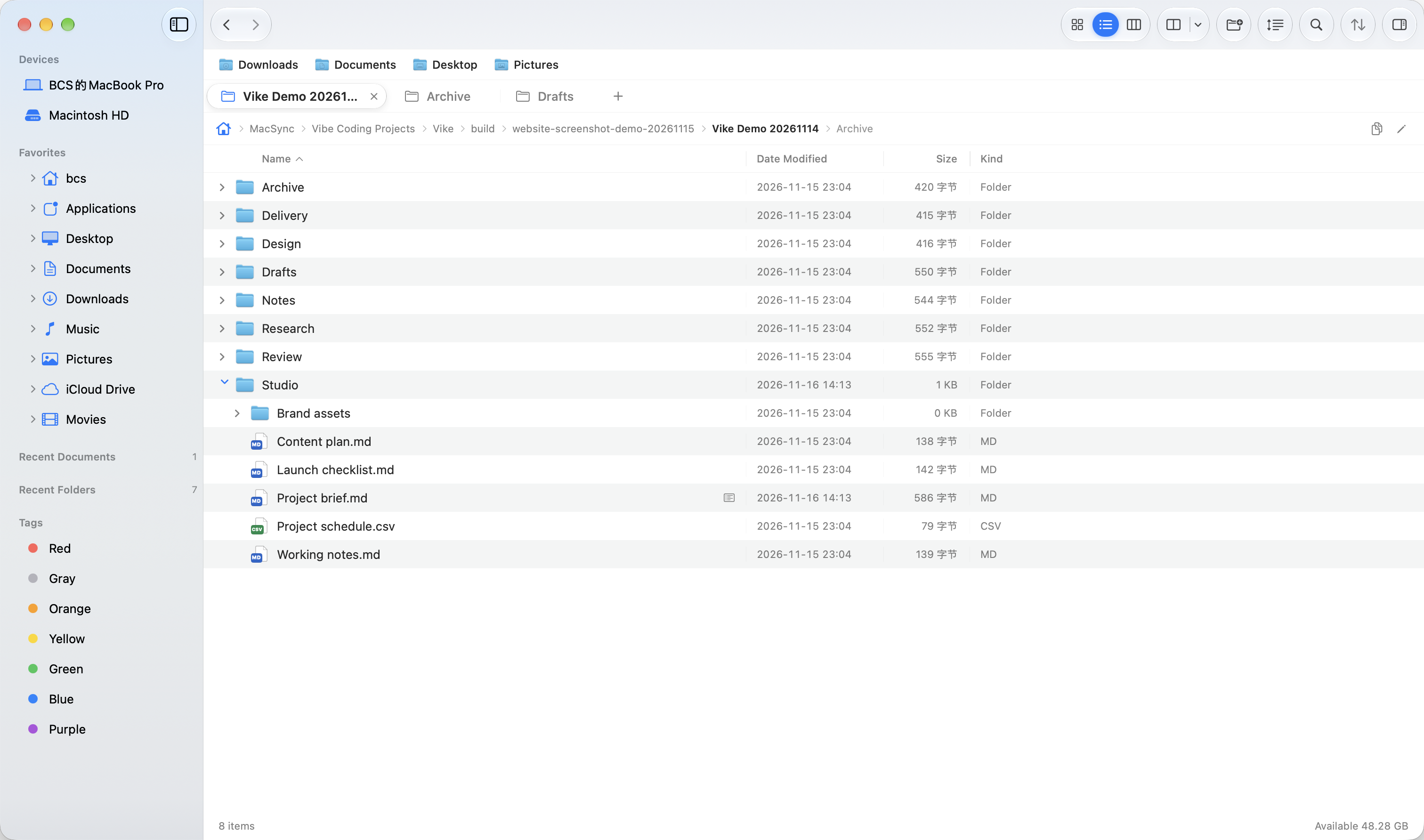
Mac storage is precious. Vike shows the size of every folder right in the list, so you can spot the ones you don't need and clean them up on the spot.

  • Calculated automatically on internal disks
  • Enable size calculations for external, network and iCloud folders when needed
Vike showing folder sizes directly in the file list

For creators

Shrink images in one step

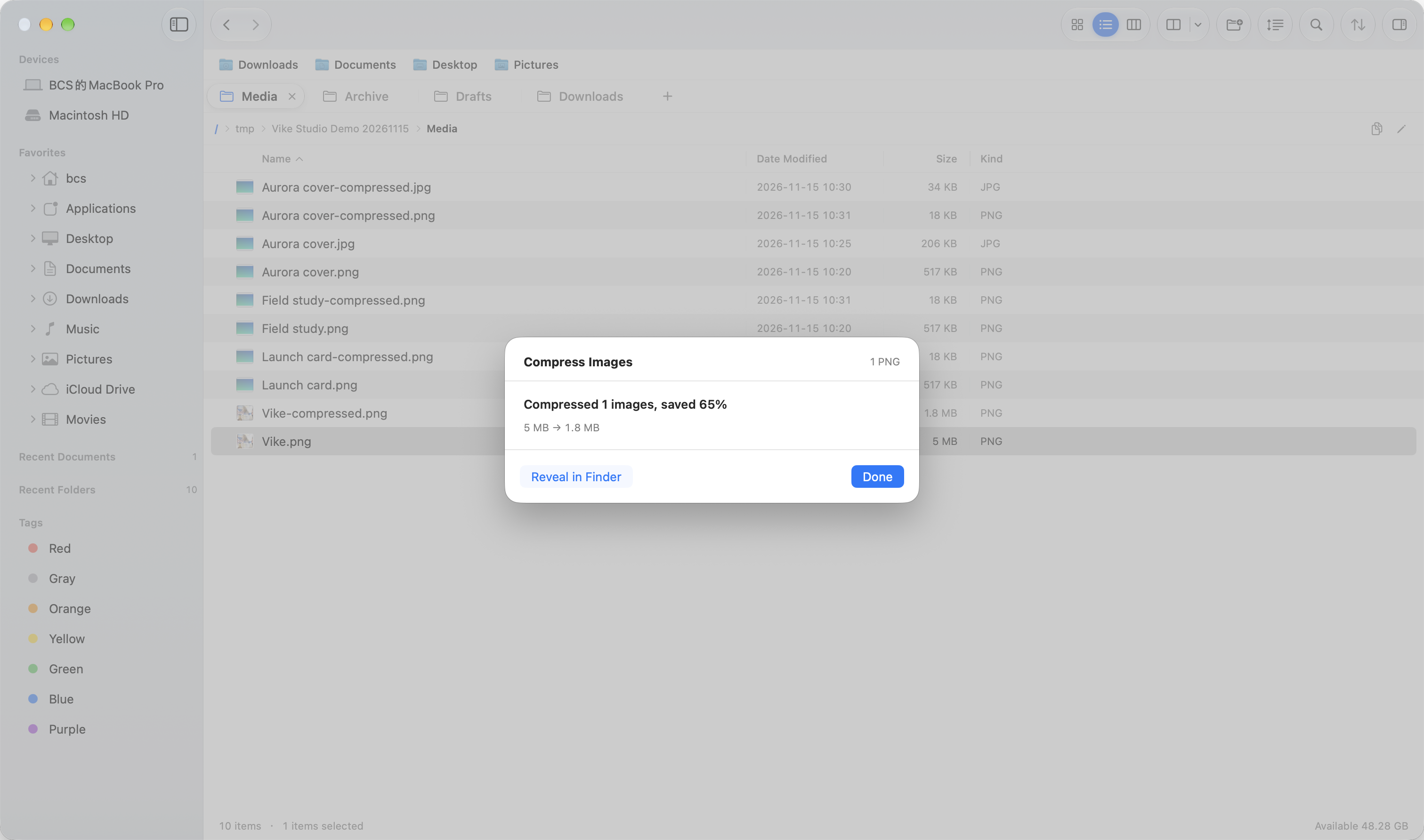
Some platforms limit image size. Select a batch of JPEG or PNG files and compress them right from the context menu. Your originals stay untouched, with the results saved alongside them.

  • Works on many images at once
  • Originals stay exactly as they were
  • More image tools are on the way
Vike image compression results showing a saved PNG copy and space saved

Lots of small things that save time

Batch rename

Rename many files at once.

Copy path & name

Copy full paths or just file names, for one file or many.

New file in place

Create a folder, text, Markdown, Word, Excel or PowerPoint file and name it right in the list.

Make it yours

Customize the toolbar, context menus and every keyboard shortcut.

ZIP in and out

Compress and extract ZIP archives.

Privacy

Your files never leave your Mac

Vike runs entirely on your Mac. It does not upload your file contents, file names, folder names, paths or search history. There is no background telemetry and no third-party analytics, advertising or crash-reporting service.

Our promise

Yours to keep, even if we stop

If Vike is ever discontinued and the activation service has to shut down, we will open-source Vike before that happens. Everyone who bought a license can keep using it.

Buy once. Keep it forever.

Vike is a one-time purchase with a 14-day trial of every feature. Trial downloads and purchasing are not open yet.

Free Trial

$0

Planned: 14 days, every feature

  • Every feature unlocked
  • No credit card or sign-up
  • Your files, tags and notes are never touched when it ends
Download free trial

Questions

How many panes can I open?

There's no fixed count limit. Split any pane horizontally or vertically, or drag a tab to its edge to create another, as long as the window has enough room. Shrinking the window keeps your layout and proportions. Press ⌘P to fold the layout away, then press it again to restore every pane and tab.

Which everyday file-management features are included?

Tabs, a favorites bar, side-by-side panes, flexible splitting, and double-clicking empty space to go up one folder are all built in.

How does the free trial work?

The public-release plan is a 14-day full-feature trial without a credit card, followed by a personal license. Trial downloads and licensing are not open yet. The plan preserves your files, tags and notes when the trial ends.

Does Vike replace Finder?

You can set Vike as your default file manager, so other apps open folders in Vike. Finder keeps working as usual, and tags you add in Vike show up there too.

Where are properties and notes stored?

Properties and notes are stored in the file's extended attributes. They are preserved when you copy or move the file to a disk that supports extended attributes.

What happens when I get a new Mac?

One license will cover one Mac at a time. When you switch Macs, you can deactivate the old one in the app, then activate the new one. Licensing and device management are not yet available.

Does Vike need an internet connection?

Current file-management features work offline. The public-release licensing plan includes online activation and occasional license checks; that system has not launched yet.

Are updates free?

The public-release plan is a one-time purchase with lifetime free updates. Purchasing is not open yet.

Can I get a refund?

The planned refund policy allows a refund within 14 days of purchase. Purchasing is not open yet.

Which Macs are supported?

Vike requires macOS 14 or later. The current development build is for Apple Silicon. A universal release is planned after Intel verification. Liquid Glass requires macOS 26 or later.

Does Vike upload my files?

No. Current file-management features do not upload file contents, names, paths or search history.